> ## Documentation Index
> Fetch the complete documentation index at: https://docs.seekr.com/llms.txt
> Use this file to discover all available pages before exploring further.
# Create a fine-tuning job
> Launch and manage model fine-tuning jobs in SeekrFlow with step-by-step guidance for configuring training parameters, setting up infrastructure, and monitoring progress through event tracking and loss visualization.
## Start a fine-tuning job
Here’s a comprehensive example of how to create a fine-tuning job for a Llama 3 8B Instruct model with specific training parameters.
### Before you start: prepare your training data
How you prepare your training data depends on what you’re starting with:
* **If you have raw documents** (PDFs, DOCX, Markdown): use the Data Engine to ingest and convert them into a training-ready dataset first. See \[doc:data-engine-sdk].
* **If you already have a prepared JSONL or Parquet file**: upload it directly in Step 3 below.
To create a fine-tuning job, you’ll first create a project, to which you can associate a fine-tuning run. You can also retrieve project information and get a list of all of your projects:
### Step 1: Create a project
```python Python theme={null}
import os
from seekrai import SeekrFlow
client = SeekrFlow()
# Create a new project
proj = client.projects.create(name="my_project", description="a bot that answers questions about film tropes")
```
### Step 2: Retrieve project ID
You can locate your specific project with its ID, which you'll need for creating your fine-tuning job, by listing all projects. Project ID is an integer and precedes the project name you set; e.g., `id=588, name='horrorbotv4'`. This is also where to find the rest of the information for your project, including creation and update timestamps, number of runs and number of deployments.
**Endpoints:**
`GET v1/flow/fine-tune` [List Fine-Tuning Jobs](/flow/reference/list_fine_tune_v1_flow_fine_tunes_get)
`GET v1/flow/fine-tunes/{fine_tune_id}` [Retrieve Fine-Tuning Job](/flow/reference/get_fine_tune_v1_flow_fine_tunes__fine_tune_id__get)
```python Python theme={null}
# List all projects
client.projects.list()
# Get project info
client.projects.retrieve(proj.id)
```
Before you start a fine-tuning run, you'll need to upload your training file and retrieve its file ID.
### Step 3: Upload a training file
**Endpoint:** `PUT https://flow.seekr.com/v1/flow/files`
**Accepted formats:** JSONL and Parquet
The required JSONL schema varies by `purpose`. See [Upload file](/flow/reference/file_upload_v1_flow_files_put) for the correct schema for each purpose value.
**cURL example:**
```curl cURL theme={null}
curl -X PUT https://flow.seekr.com/v1/flow/files \
-H "Authorization: " \
-F "files=@/path/to/training_data.jsonl" \
-F "purpose=fine-tune"
```
**SDK example:**
```python Python theme={null}
response = client.files.upload("/path/to/training_data.jsonl", purpose="fine-tune")
print(f"Uploaded file ID: {response.id}")
```
### Step 4: Retrieve training file ID
**Endpoint:** `GET v1/flow/files` [List all files](/flow/reference/list_files_v1_flow_files_get)
```python Python theme={null}
# List all files
files_response = client.files.list()
for file in files_response.data:
print(f"ID: {file.id}, Filename: {file.filename}")
```
**Sample response:**
```curl cURL theme={null}
ID: file-1234567890, Filename: example_converted_2025-04-24_17-25-58-20250424211627-qa-pairs.parquet
```
### Step 5: Training configuration
**Endpoint:** `POST v1/flow/fine-tunes` [Create a Fine-Tuning Job](/flow/reference/fine_tune_v1_flow_fine_tune_post)
Next, specify a `TrainingConfig` object and an `InfrastructureConfig` object.
The `TrainingConfig` defines all parameters that affect the actual code of the training script, such as the base model to be fine-tuned, number of epochs, quantization, etc.
The `InfrastructureConfig` defines the infrastructure for the fine-tuning job. Gaudi2 is available on SeekrFlow, with other compute options available for on-prem installations and AI appliances.
This example uses 8 Gaudi2 instances, which triggers SeekrFlow to run on multi-card training mode:
```python Python expandable theme={null}
from seekrai.types import TrainingConfig, InfrastructureConfig
from seekrai import SeekrFlow
import os
base_url = "https://flow.seekr.com/v1/"
client = SeekrFlow(base_url=base_url)
proj = client.projects.create(name="helperbot", description="a bot answers questions about film tropes")
training_config = TrainingConfig(
training_files=['file-317b8ad2-21dd-11f0-9126-3a035e72fce7'], #find the file id of your parquet file by listing all files
model="meta-llama/Meta-Llama-3-8B-Instruct",
n_epochs=1,
n_checkpoints=1,
batch_size=4,
learning_rate=1e-5,
experiment_name="helperbot_v1",
)
infrastructure_config = InfrastructureConfig(
n_accel=8,
accel_type="GAUDI2",
)
```
### Step 6: Fine-tune a base model
Now that you've created your configuration files, you're ready to fine-tune a model!
**Endpoint:** `POST v1/flow/fine-tune` [Create a Fine-Tuning Job](/flow/reference/fine_tune_v1_flow_fine_tune_post)
```python Python theme={null}
fine_tune = client.fine_tuning.create(
training_config=training_config,
infrastructure_config=infrastructure_config,
project_id = 123,
)
ft_id = fine_tune.id
#print status
print(client.fine_tuning.retrieve(fine_tune.id).status)
```
**Sample response:**
```curl cURL theme={null}
Uploading file-1234567890-qa-pairs.parquet: 100%|█| 85.8k/85.8k [00:00<00:00, 86.2kB/s]
FinetuneJobStatus.STATUS_QUEUED
```
## Tune model hyperparameters
Hyperparameters are the configurable parts of a model's learning process, and tuning them allows you to tweak model performance for optimal results. Hyperparameters play a crucial role in the training process, impacting both performance and training efficiency. Here’s a guide to essential hyperparameters, organized by impact level and the logical order for tuning large text models.
### Learning rate
This is the most critical hyperparameter, because it determines whether your model will converge properly. Tune this one first, since it forms the foundation of your optimization process.
**Consider impact on convergence:** The learning rate controls how much the model’s weights are updated with respect to the loss gradient. A high learning rate can lead to rapid convergence but risks overshooting the optimal solution, while a low learning rate ensures stable convergence but may require more training epochs.
**Start with a small value:** A common practice is to start with a small learning rate (e.g., 0.001) and adjust based on the training performance.
## Batch size
Next in the tuning sequence, batch size directly interacts with learning rate: the effective learning rate is often considered learning rate × batch size, e.g., if you increase batch size from 32 to 64, you might try increasing learning rate by approximately 2× to maintain similar training dynamics. **Note:** This relationship isn't perfectly linear in practice; at very large batch sizes, more increases in learning rate can lead to instability.
**Memory constraints:** Larger batch sizes require more memory, but can lead to faster and more stable training due to more accurate gradient estimates.
**Training speed:** Smaller batch sizes can lead to noisier updates, but may converge faster due to more frequent weight updates.
**Experimentation:** Start with a moderate batch size (e.g., 32 or 64) and adjust based on memory availability and training speed.
### Epochs
Number of epochs should be determined after you've established stable learning rate and batch size settings, because these parameters together will determine how quickly your model converges.
**Overfitting:** More epochs allow the model to learn more from the data, but also increase the risk of overfitting (where the model learns the task *too* well, leading to poor generalization on unseen data).
**Training time:** The number of epochs impacts the total training time. Ensure that the chosen number of epochs balances training time with model performance.
### Max length
Max length defines context window capacity and affects the model's ability to understand and generate coherent text. It's a a high-impact architectural decision that affects the model's fundamental capabilities, but is often constrained by hardware limitations.
**Sequence length:** The maximum length of input sequences the model will handle. Longer sequences can capture more context but require more memory and computation.
**Balance length:** Choose a length that balances capturing sufficient context with computational efficiency.
**Task requirements:** Set these based on the typical length of the input data for your task.
## Monitor your fine-tuning run
All job runs are tracked using SeekrFlow's event monitoring and tracking system.
To retrieve the status and progress of a run, use this:
**Endpoint:** `GET v1/flow/fine-tunes/{fine_tune_id}` [Retrieve Fine-Tuning Job](/flow/reference/get_fine_tune_v1_flow_fine_tunes__fine_tune_id__get)
```python Python theme={null}
print(client.fine_tuning.retrieve(fine_tune.id).status)
```
### Plot training loss
A training loss chart is automatically generated for you via our [UI](https://apps.seekr.com/flow): Just navigate to Projects and choose your project from the directory.
```python Python expandable theme={null}
import matplotlib.pyplot as plt
ft_id = fine_tune.id
events = client.fine_tuning.retrieve(ft_id).events
ft_response_events_sorted = sorted(events, key=lambda x: x.epoch)
epochs = [event.epoch for event in ft_response_events_sorted]
losses = [event.loss for event in ft_response_events_sorted]
plt.figure(figsize=(8, 4))
plt.plot(epochs, losses, marker="o", linestyle="-", color="b")
plt.xlabel("Epoch")
plt.ylabel("Loss")
plt.title("Training Loss Over Epochs")
plt.grid(True)
max_labels = 10
step = max(1, len(epochs) // max_labels)
plt.xticks(epochs[::step], rotation=45)
plt.tight_layout()
plt.show()
```
#### How to interpret a training loss chart
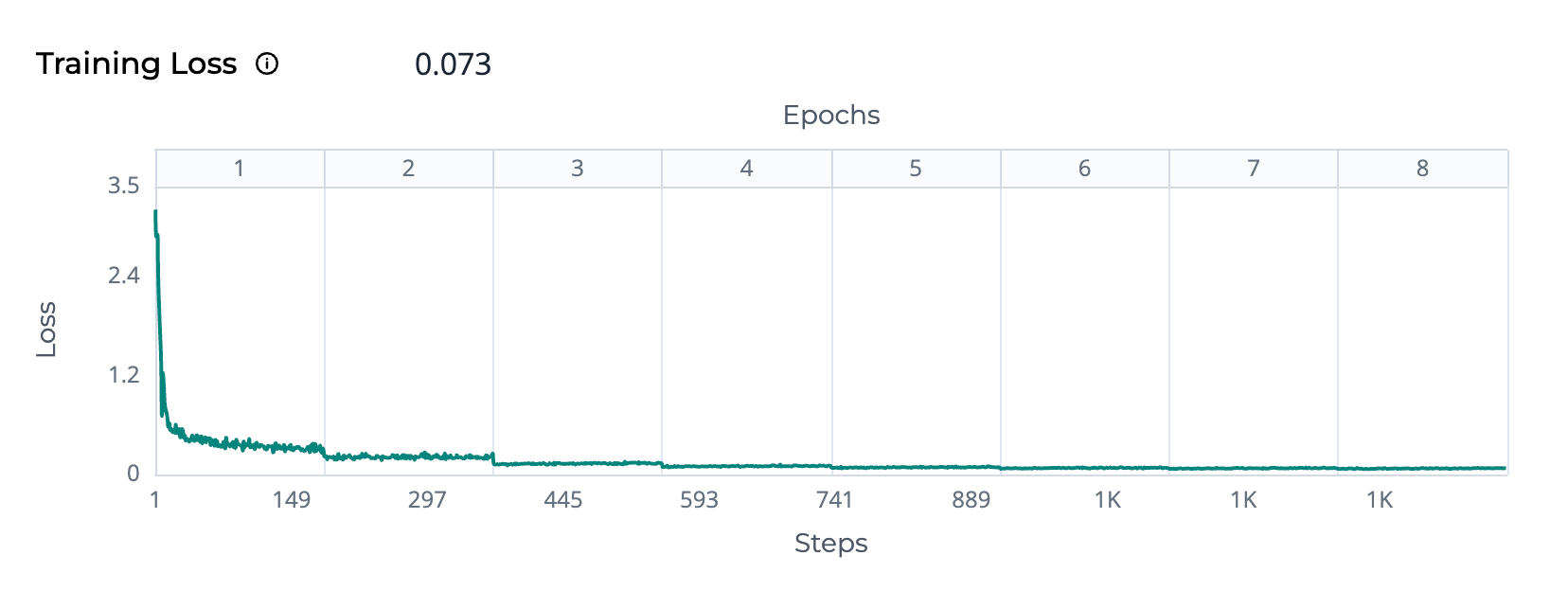 The training loss measures how closely predictions match actual values. A lower value and downward curve forming an elbow shape signal progress; watch out for a flat line or rising lines to indicate learning issues.
**Loss:** The Y-axis represents training loss, which quantifies the difference between the model's predictions and the actual target values. A lower loss indicates better performance. **Epochs:** The upper X-axis shows epochs, where each epoch corresponds to one complete pass through the entire training dataset. **Steps:** The lower X-axis represents the training steps, calculated as: Total Steps = (Total Number of Samples ÷ number of instances \* Batch Size) × Number of Epochs
**Decreasing loss curve:** Indicates that the model is learning and improving its predictions. **Plateauing loss curve:** The model may have reached its learning capacity with the current configuration.
* Try adjusting hyperparameters (e.g., learning rate, batch size) and retrain to see if the model improves.
**Increasing loss curve:** May indicate overfitting or issues with the training process.
* Review data quality to ensure the training data is clean and representative of the problem space, and retrain with a higher-quality dataset.
The training loss measures how closely predictions match actual values. A lower value and downward curve forming an elbow shape signal progress; watch out for a flat line or rising lines to indicate learning issues.
**Loss:** The Y-axis represents training loss, which quantifies the difference between the model's predictions and the actual target values. A lower loss indicates better performance. **Epochs:** The upper X-axis shows epochs, where each epoch corresponds to one complete pass through the entire training dataset. **Steps:** The lower X-axis represents the training steps, calculated as: Total Steps = (Total Number of Samples ÷ number of instances \* Batch Size) × Number of Epochs
**Decreasing loss curve:** Indicates that the model is learning and improving its predictions. **Plateauing loss curve:** The model may have reached its learning capacity with the current configuration.
* Try adjusting hyperparameters (e.g., learning rate, batch size) and retrain to see if the model improves.
**Increasing loss curve:** May indicate overfitting or issues with the training process.
* Review data quality to ensure the training data is clean and representative of the problem space, and retrain with a higher-quality dataset.